
Baby Monitor Safety Tips Every Parent Should Know
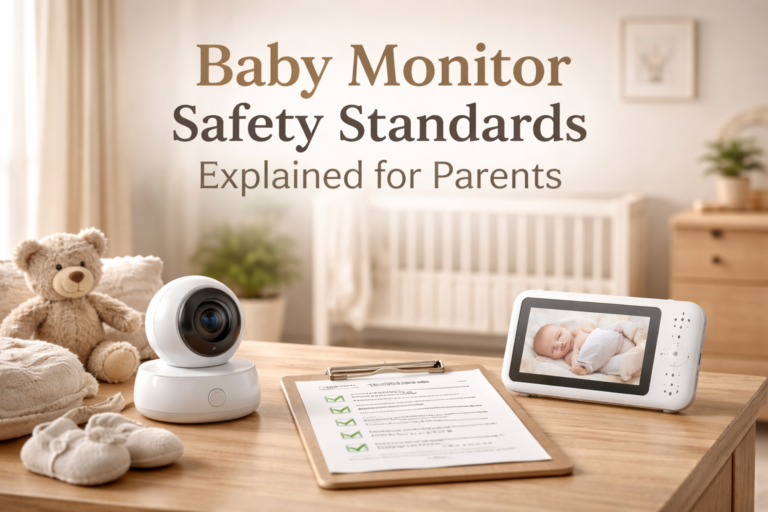
Baby monitor safety tips are something most parents don’t think about until everything is already set up. The monitor is on, the camera works, and it feels like everything is under control.
But a baby monitor is only as safe as the way it’s used.
Small details like camera placement, loose cords, weak privacy settings, or relying too much on the screen can quietly introduce risks over time. In many cases, the device itself is not the problem. The setup is.
After testing baby monitors in real homes, one thing becomes clear. The biggest safety issues rarely come from the monitor. They come from how it’s positioned, secured, and used day to day as your baby grows.
In this guide, you’ll learn the most important baby monitor safety tips, including where to place your monitor, how to secure cables, how to protect your privacy, and how to use your monitor in a way that actually supports safer sleep.
Just as important, we’ll explain what a baby monitor can do and what it should never replace.
Quick Answer: What Are the Most Important Baby Monitor Safety Tips?
Place the monitor at least 3 feet (1 meter) away from the crib
Keep all cords completely out of reach and secured
Use strong passwords and keep software updated if you use a WiFi monitor
Check signal, battery, and positioning regularly
Never rely on a baby monitor as a substitute for safe sleep practices
Used correctly, a baby monitor can improve safety and peace of mind, but only if it’s set up and maintained properly.
Baby Monitor Safety Tips: Why Proper Setup Matters
One of the most important baby monitor safety tips is choosing the right location for the camera and paMost baby monitor safety tips focus on simple rules like keeping the camera out of reach or checking the battery. Those are important, but they do not tell the full story.
What really matters is how your entire setup works in a real home.
A monitor that is slightly too close to the crib, a cable that becomes reachable after a few weeks, or a camera angle that no longer shows the full sleep area can all reduce safety without being immediately obvious.
As your baby grows, your setup needs to change with them. What feels safe for a newborn may not be safe once your baby starts rolling, sitting, or pulling up.
The goal is not to follow a checklist once and forget about it. The goal is to create a setup that stays safe over time and gives you a clear, reliable view of your baby without introducing new risks.
Safe Placement: Where to Put Your Baby Monitor?
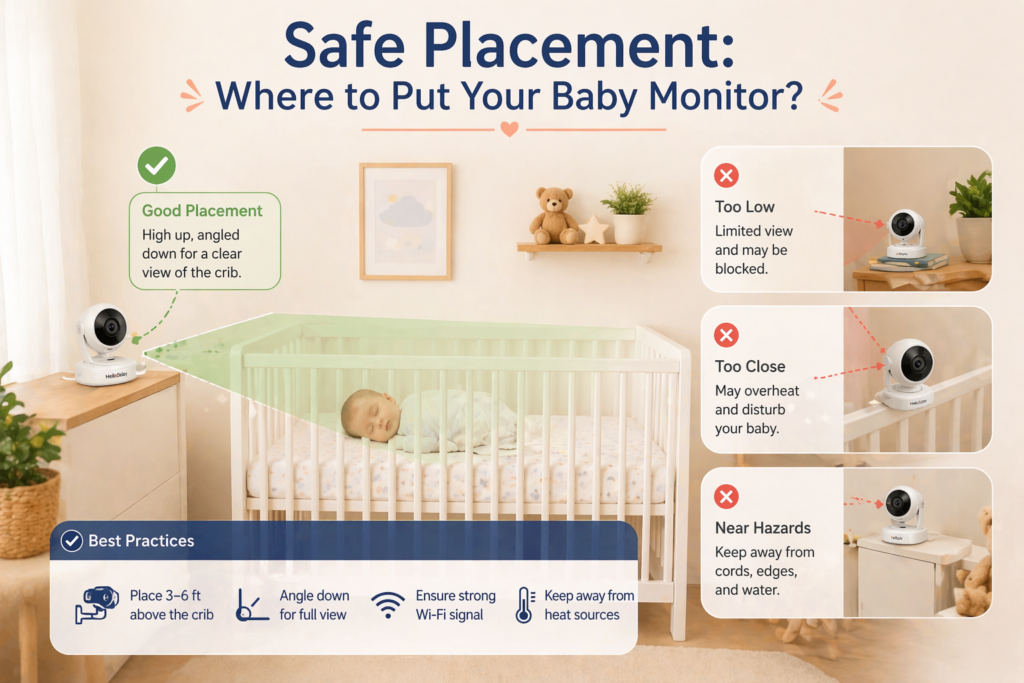
One of the most important baby monitor safety tips is simple, but often done wrong. Placement matters more than the monitor itself.
The safest position is at least 3 feet, or about 1 meter, away from the crib. This distance helps prevent your baby from reaching the camera or any attached cables as they grow and become more mobile.
A wall mount or a firmly secured shelf is usually the best option. The monitor should not be placed on the crib, attached to the rails, or sitting on unstable furniture that could shift or fall.
A slightly elevated angle works best. Instead of placing the camera directly above the baby, aim for a diagonal view that shows the entire sleep area. This gives you a clear picture without needing to place the monitor too close.
It’s also important to think ahead. A setup that feels safe when your baby is a newborn may not be safe a few months later. As babies start rolling, sitting, and eventually standing, their reach increases quickly.
A good habit is to check your monitor placement every few weeks. If there is any chance your baby could reach it, it needs to be moved.
If you are still deciding between different types of monitors, especially non-WiFi models that are often easier to set up safely, you can also see our guide on the best baby monitors without WiFi for a more complete overview of safe and reliable options.
Keep Cords and Wires Completely Out of Reach
Among all baby monitor safety tips, cord safety is one of the most important and most often overlooked.
Monitor cables are not just messy or inconvenient. As your baby grows, they can become a real hazard if they are within reach. Babies move more than most parents expect, and what feels far away today may be reachable much sooner than you think.
The safest approach is to keep all cords at least 3 feet, or about 1 meter, away from the crib and completely secured. This includes power cables, charging cords, and any extra wiring connected to the monitor.
Loose or hanging cords should never be left behind furniture or along the edge of the crib. Even if they seem out of the way, they can shift over time or become accessible as your baby starts pulling, grabbing, and exploring.
Simple solutions make a big difference. Use wall clips to guide the cable along the wall, cord covers to keep everything enclosed, or route the cable behind furniture in a way that it cannot be reached or pulled down.
It is also important to recheck this regularly. Moving furniture, adjusting the monitor, or even cleaning the room can change how cables are positioned. What was safe last week may not be safe today.
A good rule is this. If you can see a cord from the crib, your baby may eventually be able to reach it. When in doubt, move it further away and secure it again.
Protect Your Privacy and Security
Privacy is one of the biggest concerns parents have when using a baby monitor, especially with WiFi models. While most modern devices are designed with security in mind, how you set up and use your monitor plays a major role in how safe it actually is.
If you are using a WiFi baby monitor, start with the basics. Always create a strong, unique password and avoid reusing passwords from other accounts. If the app offers two factor authentication, it is worth enabling for an extra layer of protection.
Keeping your device and app updated is just as important. Software updates often include security improvements, and skipping them can leave your monitor more exposed than it needs to be.
It also helps to limit access. Only share login details with people you trust, and avoid connecting your monitor to public or unsecured networks. A private home network with a strong password is always the safer option.
For parents who prefer a simpler setup with fewer security concerns, non WiFi baby monitors can be a strong alternative. These models use a direct connection between the camera and the parent unit, which means they are not exposed to the internet in the same way. If you are comparing options, you can read our full guide to the best baby monitors without WiFi to see which models offer both reliability and peace of mind.
The goal is not to worry about every possible risk, but to use your monitor in a way that is thoughtful and secure. A few simple habits can make a big difference over time.
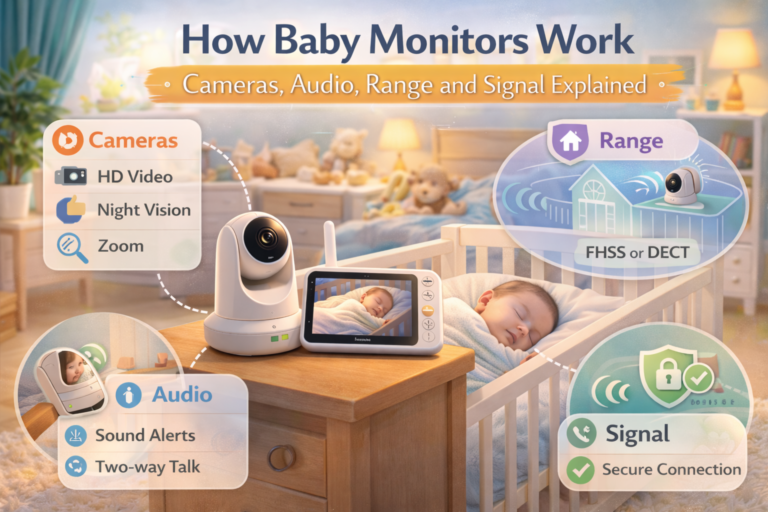
If privacy is a priority, a non-WiFi baby monitor with FHSS or DECT technology is often the safer choice.
Check the Monitor Regularly
RIt is easy to assume that once your baby monitor is set up, it will keep working the same way every day. In reality, small changes can affect how reliable it is over time.
One of the most common issues parents run into is signal loss or reduced range. This can happen without warning, especially if something in the home changes. Moving furniture, adding new devices, or even closing doors can impact how stable the connection is.
Battery performance is another area to watch. A monitor that lasts through the night when it is new may not perform the same way after months of use. If the battery runs low overnight, you may miss alerts or lose video when you need it most.
It is also worth checking the camera angle from time to time. As your baby grows and moves more, the position that once showed the entire crib may no longer give you a clear view.
A simple habit can prevent most of these issues. Take a moment every few days to check your monitor during normal use. Make sure the signal is stable, the battery is holding up, and the camera still shows the full sleep area.
You do not need to constantly adjust your setup, but regular checks help you catch small problems before they become bigger ones.
Avoid Interference and Signal Dropouts
One of the most frustrating issues parents face is a baby monitor that suddenly loses signal or starts cutting out, especially during the night.
In most cases, the problem is not the monitor itself. It is interference.
Wireless baby monitors share space with other devices in your home, including WiFi routers, smartphones, tablets, and even smart TVs. When too many devices are competing on similar frequencies, the connection between the camera and the parent unit can become unstable.
Walls also play a bigger role than most people expect. Thick walls, concrete, metal structures, and even large furniture can weaken the signal. A monitor that works perfectly in one room may struggle just a few meters away if there are multiple obstacles in between.
There are a few simple ways to improve stability.
Try to position the monitor so there is a clearer path between the camera and the parent unit. Even small adjustments in placement can make a noticeable difference.
Keep the parent unit away from other wireless devices when possible. Placing it right next to a router or phone can increase interference.
If your monitor allows it, switching channels can also help reduce signal congestion, especially in homes with many connected devices.
It is also important to understand the difference between advertised range and real use. Many monitors are rated for long distances in open space, but inside a home the effective range is usually much shorter.
If you are dealing with a larger home or multiple floors, choosing a model known for strong and stable signal can make a significant difference. You can explore reliable long range options in our guide to the best long range baby monitors to find models that perform better in real conditions.
A stable connection is not just about convenience. It is what allows your monitor to do its job consistently, without gaps or surprises.
Understand Radiation and Exposure
Concerns about radiation are common when it comes to baby monitors, especially with wireless and WiFi models. It is natural to wonder whether having a device near your baby for hours at a time is safe.
Baby monitors emit low levels of radiofrequency energy, similar to many everyday devices like smartphones, routers, and Bluetooth accessories. For most families, the exposure from a properly placed monitor is considered low.
What matters most is how the monitor is used.
Keeping a safe distance between the monitor and the crib significantly reduces exposure. This is another reason why placing the camera at least 3 feet away is recommended, not only for physical safety but also for peace of mind.
If you prefer to minimize exposure even further, there are simple ways to do it. You can turn off the monitor when it is not needed, avoid placing it very close to your baby, and choose models that use lower transmission power or do not rely on WiFi.
Non WiFi baby monitors are often preferred by parents who want a more straightforward setup with less overall wireless activity. These models use a direct connection between the camera and the parent unit, which reduces reliance on internet based signals. If you want to compare options, you can also explore our guide to the best baby monitors without WiFi for models that focus on simplicity and reliability.
The key is to keep things in perspective. With proper placement and normal use, a baby monitor can be a safe and helpful tool. Small adjustments in setup can go a long way in addressing concerns while keeping the benefits of monitoring.
Create a Backup Safety Routine
A baby monitor is helpful, but it should never be the only thing you rely on.
Even the most reliable monitor can lose signal, run out of battery, or stop working without warning. That is why it is important to have a simple backup routine, especially during the night.
One of the easiest habits to build is to check on your baby in person at regular intervals, particularly if something seems off or different than usual. A monitor can show you a lot, but it cannot replace being physically present when it matters.
It also helps to think about what you would do if the monitor suddenly stopped working. Keeping the parent unit charged, having a charger nearby, and knowing how to quickly check the nursery without relying on the screen can make a big difference.
Some parents also keep the volume on high enough to hear important sounds even if they are not actively watching the screen. Others prefer vibration or alert modes as an additional layer of awareness.
The goal is not to create extra stress or constant checking. It is to have a simple, reliable routine that supports the monitor instead of depending entirely on it.
When used this way, a baby monitor becomes part of a safer system, not a single point of failure.
Frequently Asked Questions
Are baby monitors safe to use?
Yes, baby monitors are generally safe when used correctly. The most important factors are proper placement, keeping cords out of reach, and using secure settings for WiFi models. The risks usually come from how the monitor is set up, not the device itself.
How far should a baby monitor be from the crib?
A baby monitor should be placed at least 3 feet, or about 1 meter, away from the crib. This helps prevent your baby from reaching the camera or cables and reduces unnecessary exposure.
Can baby monitor cords be dangerous?
Yes, cords can become a hazard if they are within reach of the crib. As babies grow and start moving more, they can grab or pull cables. All cords should be secured and kept well out of reach at all times.
Are WiFi baby monitors safe from hacking?
Most modern WiFi baby monitors are secure when set up properly. Using a strong password, keeping software updated, and avoiding public networks greatly reduces the risk. Parents who prefer a simpler setup often choose non WiFi monitors to minimize security concerns.
Do baby monitors emit radiation?
Baby monitors emit low levels of radiofrequency energy, similar to other everyday wireless devices. With proper placement and normal use, exposure is considered low. Keeping the monitor at a safe distance helps reduce it even further.
Can I rely on a baby monitor all night?
A baby monitor is a helpful tool, but it should not replace regular checks and safe sleep practices. It is best used as an extra layer of awareness, not the only way to monitor your baby.
When should I adjust my baby monitor setup?
You should recheck your setup regularly, especially as your baby grows. Rolling, sitting, and standing all increase your baby’s reach, which can make a previously safe setup unsafe if not adjusted.
Final Thoughts on Baby Monitor Safety Tips
Baby monitor safety tips are not about making things complicated. They are about paying attention to a few key details that make a real difference over time.
A well placed monitor, secured cords, stable signal, and basic privacy settings can turn your setup into something you can rely on every day. Most risks are easy to avoid once you know what to look for, and small adjustments often go a long way.
It also helps to keep things in perspective. A baby monitor is there to support you, not to replace safe sleep practices or your own awareness as a parent. The goal is not constant checking or worry, but a simple setup that gives you confidence and peace of mind.
If you are still choosing the right monitor for your needs, especially if safety and simplicity are your priorities, you can also explore our guide to the best baby monitors without WiFi to find options that are easy to set up and reliable in everyday use.
With the right setup and a few consistent habits, a baby monitor becomes exactly what it should be. A helpful tool that makes caring for your baby a little easier and a lot more reassuring.

One Comment